
Exploring the world of QuickBooks Self-Employed Hacks for Freelancers & Creators, this introduction sets the stage for an insightful journey into optimizing financial management for independent workers.
The following paragraphs will delve into the key features, setup process, expense tracking strategies, invoicing techniques, tax preparation tips, and more to empower freelancers and creators in managing their finances effectively.
QuickBooks Self-Employed Overview
QuickBooks Self-Employed is a financial management tool specifically designed for freelancers and creators to simplify their accounting processes and help them stay organized. It offers a range of features tailored to the needs of self-employed individuals, making it easier to track expenses, income, and taxes.
Key Features of QuickBooks Self-Employed
- Automatic Expense Tracking: QuickBooks Self-Employed automatically categorizes your expenses, saving you time and ensuring accuracy.
- Invoicing: Create professional-looking invoices and track payments to help you get paid faster.
- Mileage Tracking: Keep track of your business mileage for potential tax deductions.
- Tax Estimation: Estimate your quarterly taxes based on your income and expenses to avoid surprises at tax time.
Tracking Expenses and Income with QuickBooks Self-Employed
One of the most valuable aspects of QuickBooks Self-Employed is its ability to track both expenses and income in one place. By linking your bank accounts and credit cards, you can see a comprehensive view of your finances and easily monitor your cash flow.
This feature is essential for freelancers and creators who need to stay on top of their financial health to make informed business decisions.
Importance of Using Accounting Software Tailored for Self-Employed Individuals
Using accounting software like QuickBooks Self-Employed that is specifically designed for self-employed individuals can make a significant difference in how efficiently you manage your finances. These tools streamline processes, reduce manual data entry, and provide valuable insights into your business performance.
By utilizing software tailored to your needs, you can save time, reduce errors, and focus more on growing your freelance or creative business.
Setting Up QuickBooks Self-Employed
When it comes to setting up QuickBooks Self-Employed, it's essential to follow a few simple steps to ensure smooth operations for your freelance or creative business.To get started, here is a step-by-step guide on how to set up a new account on QuickBooks Self-Employed:
Create a New Account
- Go to the QuickBooks Self-Employed website and click on the "Sign Up" button.
- Enter your email address and create a password for your account.
- Follow the on-screen instructions to provide basic information about your business.
- Complete the setup process by verifying your email and setting up your profile.
Linking Bank Accounts and Credit Cards
It's important to link your bank accounts and credit cards to QuickBooks Self-Employed to track your income and expenses accurately. Here are some tips on how to link them:
- Log in to your QuickBooks Self-Employed account and navigate to the "Banking" tab.
- Click on "Add Account" and search for your bank or credit card provider.
- Enter your login credentials for the bank or credit card account and follow the prompts to link them to QuickBooks Self-Employed.
- Review the transactions that are imported to ensure accuracy.
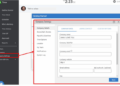
Customizing Categories
Customizing categories in QuickBooks Self-Employed allows you to tailor the platform to fit your individual business needs. Here's how you can do it:
- Go to the "Transactions" tab and click on "Review" to see all your transactions.
- Click on a transaction and select a category from the dropdown menu or create a new one.
- Customize categories by editing existing ones or adding new ones that align with your business expenses.
- Save your changes to ensure that transactions are correctly categorized moving forward.
Maximizing Expense Tracking
Tracking business expenses efficiently is crucial for freelancers using QuickBooks Self-Employed to manage their finances. It not only helps in staying organized but also ensures accurate tax reporting. Categorizing expenses correctly is essential for tax purposes, making it easier to claim deductions and maximize savings.
Utilizing the mobile app for real-time expense tracking allows freelancers to stay on top of their finances even while on-the-go.
Benefits of Categorizing Expenses Accurately
Categorizing expenses accurately in QuickBooks Self-Employed offers several benefits:
- Ensures proper tax reporting: By assigning expenses to the correct categories, freelancers can accurately report their business expenses for tax purposes.
- Maximizes deductions: Proper categorization enables freelancers to identify deductible expenses, ultimately reducing their taxable income and saving money.
- Organizes financial data: Categorizing expenses helps in organizing financial records, making it easier to track spending and analyze business finances.
Tips for Real-Time Expense Tracking with the Mobile App
Freelancers can make the most of the QuickBooks Self-Employed mobile app for real-time expense tracking by following these tips:
- Scan receipts on-the-go: Use the app's receipt scanning feature to capture and store receipts digitally, eliminating the need for paper receipts.
- Set up automatic categorization: Configure the app to automatically categorize recurring expenses, saving time and ensuring consistency in expense tracking.
- Track mileage effortlessly: Utilize the mileage tracking feature to automatically log business mileage, ensuring accurate deduction claims for vehicle-related expenses.
- Synchronize bank accounts: Connect bank accounts to the app for seamless integration of transactions, enabling real-time expense tracking and accurate financial reporting.
Invoicing and Payment Tracking
Creating and sending invoices, as well as tracking payments, are crucial tasks for freelancers and creators to ensure smooth financial management. QuickBooks Self-Employed offers user-friendly features to streamline these processes effectively.
Creating and Sending Invoices
- Access the 'Invoices' tab in QuickBooks Self-Employed.
- Fill in the invoice details, including client information, services provided, rates, and due dates.
- Customize the invoice template to reflect your brand identity.
- Preview the invoice before sending to ensure accuracy.
- Send the invoice directly from the platform to your clients.
Tracking Invoice Payments and Sending Reminders
- Receive real-time notifications when clients view and pay invoices.
- Track payment status and view overdue invoices at a glance.
- Automatically send reminders for outstanding payments to clients.
- Generate reports to analyze payment trends and manage cash flow effectively.
Integration of Payment Gateways
- QuickBooks Self-Employed integrates with popular payment gateways like PayPal and Stripe for seamless transactions.
- Link your payment gateway account to receive payments directly through the platform.
- Enable clients to pay invoices online securely, improving convenience for both parties.
- Track all payment transactions within QuickBooks Self-Employed for comprehensive financial records.
Tax Time Preparation
Preparing taxes as a freelancer can be overwhelming, but QuickBooks Self-Employed can simplify the process and help maximize deductions. Here are some strategies to make tax time less stressful.
Generating Tax Reports
- QuickBooks Self-Employed allows you to generate detailed tax reports that summarize your income, expenses, and deductions.
- You can easily export these reports to share with your accountant or use them for filing your taxes yourself.
Simplifying Deductions
- Utilize the automatic expense tracking feature to capture all deductible expenses throughout the year.
- QuickBooks Self-Employed categorizes expenses and helps you identify potential deductions, saving you time and ensuring you don't miss any write-offs.
Filing Taxes Efficiently
- With all your financial data organized in one place, filing taxes becomes more efficient and less time-consuming.
- QuickBooks Self-Employed also offers a simplified process for filing estimated quarterly taxes, helping you stay compliant with tax regulations.
Epilogue
In conclusion, the QuickBooks Self-Employed Hacks for Freelancers & Creators guide equips individuals with the knowledge and tools needed to streamline their accounting processes, maximize deductions, and prepare for tax season with confidence. Dive into the world of financial management tailored for self-employed professionals and take control of your finances today.
FAQ Resource
How can QuickBooks Self-Employed help freelancers and creators track expenses and income effectively?
QuickBooks Self-Employed provides a user-friendly platform that simplifies expense and income tracking, categorization, and reporting, making financial management seamless for self-employed individuals.
What are the benefits of using QuickBooks Self-Employed for tax preparation?
QuickBooks Self-Employed streamlines tax deductions, generates detailed reports, and simplifies the filing process for freelancers and creators, ensuring accuracy and efficiency during tax season.
How can freelancers customize expense categories on QuickBooks Self-Employed?
Freelancers can easily customize expense categories on QuickBooks Self-Employed to align with their specific business needs by creating new categories, editing existing ones, and organizing expenses efficiently.